
Passer la galerie


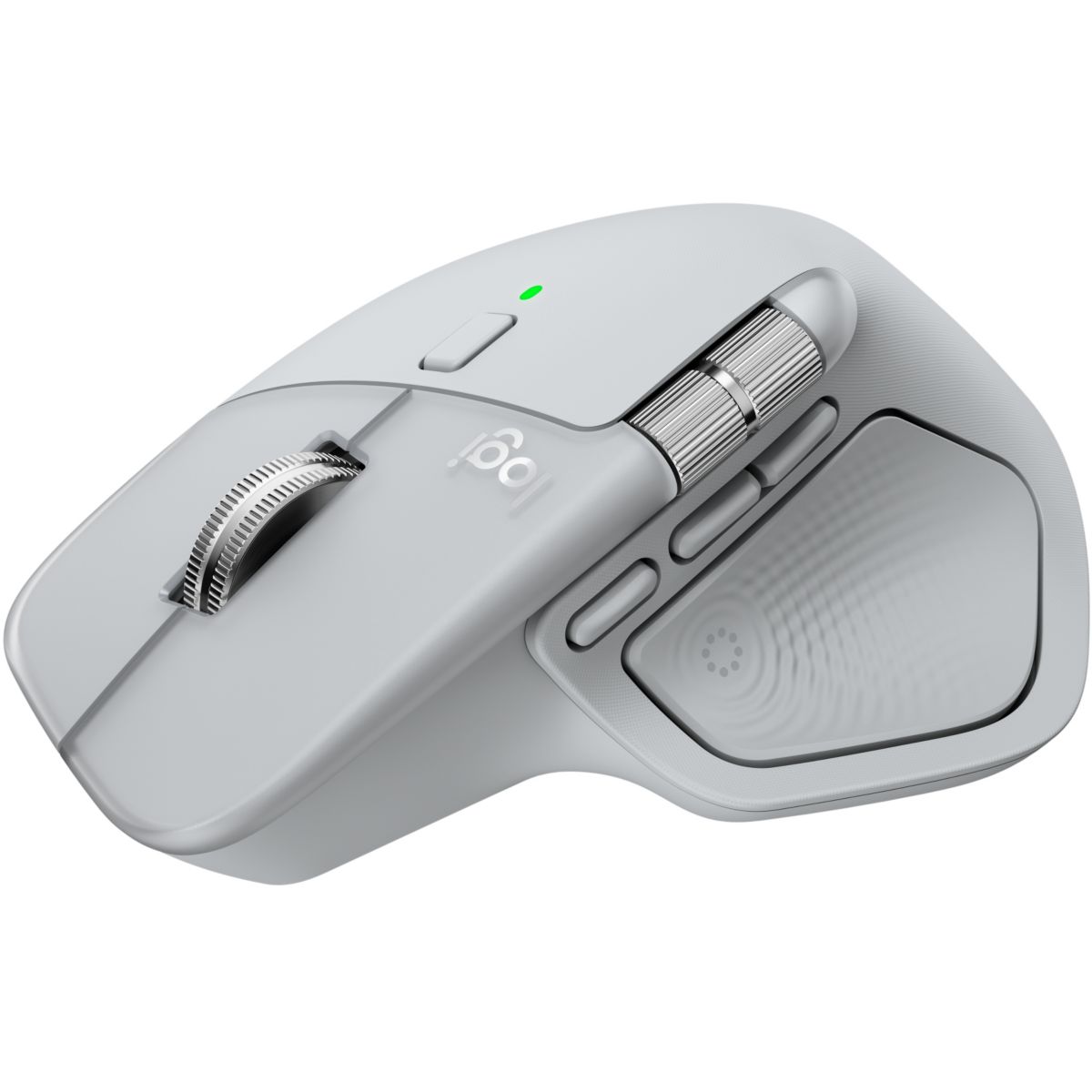
Souris sans fil rechargeable MX Master 4 Off White
Couleur Unique
-
Vendu et expédié par :Boulanger3,9/5 (1183)
-
Fabriqué à la demande Livraison sous 72h
- Livraison gratuite
- Retour gratuit
- Modes de livraison
- Retours gratuits sous 30 jours
- Livraison classique: boîte aux lettres, domicile
- Livraison dans la pièce de son choix (condition de la livraison à l’étage)
- Livraison en point Pickup La Poste ®
Articles similaires
Souris sans fil rechargeable MX Master 4 Off White - LOGITECH
La durée de garantie est de 2 ans.
| Les + de ce modèle | ||
| Avantages | Souris sans fil ergonomique avec retour haptique performant avancé, défilement ultra-rapide, charge USB-C, Bluetooth, Windows, macOS | |
| Caractéristiques générales | ||
| Capteur | Dark field | |
| Technologie | Bluetooth | |
| Utilisation | Bureautique | |
| Sensibilité max | 8000 dpi | |
| Coloris | Gris | |
| Alimentation | Batterie Lithium(câble de chargement) | |
| Forme | Ergonomique | |
| Bouton marche / arrêt | Oui | |
| Série | Série MX | |
| Autonomie | 70 jours d'autonomie | |
| Utilisateur | Droitier | |
| Distance de fonctionnement | 10.0 | |
| Et en plus | Rechargeable | |
| Autonomie : | Jusqu'à 70 jours | |
| Appareils compatibles | Windows 11 ou version ultérieure, macOS 13 ou versions ultérieures, ChromeOS, Linux, Android 12 ou version ultérieure, iPadOS 15 ou version ultérieure | |
| Connectivité | ||
| Type | Dongle USB-C, USB-C, Bluetooth | |
| USB-C | Oui | |
| Dongle USB-C | Oui | |
| Configuration | ||
| Molette | Oui | |
| Boutons programmables | 8.0 | |
| Mode | Souris | |
| Détail des boutons | Nombre de boutons: 8 (clic gauche/droit, avant/arrière, geste, changement de mode de défilement, clic central, Actions Ring) | |
| Direction molette | Bidirectionnelle | |
| Personnalisation des boutons | Connectez jusqu'à trois appareils et passez de l'un à l'autre via les boutons Actions Ring ou Easy-Switch de la souris, et transférez vos fichiers d'un dispositif à l'autre en toute simplicité avec Logi Options+ | |
| Bouton de réglage de la sensibilité | Oui | |
| Compatibilités | ||
| Systèmes compatibles | Compatible Chromebooks, Mac, Windows 11, Linux | |
| Compatible Chromebooks | Oui | |
| Windows 11 | Oui | |
| Contenu du carton | ||
| Livré avec | Notice, Récepteur USB-C Logi Bolt | |
| Dimensions | ||
| Dimensions l x h x p | 8.8 x 12.8 x 5 cm | |
| Poids | 0.15 | |
| Informations complémentaires | ||
| Fabriqué en | Chine | |
| Garantie | 24.0 | |
| Disponibilité des pièces détachées (données fournisseur) | Pas de pièce disponible | |
| Référence constructeur | MX Master 4 Off White | |
| Marque | LOGITECH | |
Tailles Taille Unique
LOGITECH vous donne plus d'informations
La Redoute s'engage
-
09/03/2026Quality product, well designed
Great mouse. The haptic feedback maybe feels fractionally gimmicky, but is not an issue. Build quality is excellent. The extra buttons are useful and not overwhelming. Sideways scroll wheel is superb, as is the excellent implementation of the standard scroll wheel - transitioning from graduated "clicky" scrolling to free-flowing fast scroll intuitively and at a user-controllable speed point. It's a shame that you only get access to the higher DPI resolution by using Options+, as it would be nice to be able to access this without relying on external software, but this is a minor gripe.
Je recommande ce produitTimothyAllenMusic , Yorkshire, England Acheteur vérifiéÂge 45 à 54 ansPublié à l'origine sur Logitech-emeaTraduction automatiqueUne erreur s'est produite. Veuillez réessayer ultérieurement. -
07/03/2026Perfect follow on to MX M line
Great upgrade from the MX Master 3, takes some getting used to the change in use of the "thumb button" but works well with the haptic feedback, will be interesting to see how apps begin to make use of this within the Options plugins! Very quiet clicks, fits well in hand and generally great to use.
Je recommande ce produitAT12 , Edinburgh Acheteur vérifiéÂge 25 à 34 ansPublié à l'origine sur Logitech-emeaTraduction automatiqueUne erreur s'est produite. Veuillez réessayer ultérieurement. -
03/02/2026Left button ptoblem
Ok but left button already sticking. This is why I replaced my mx4 so am not happy
DavidCosham , South Acheteur vérifiéÂge 65 ans ou plusPublié à l'origine sur Logitech-emeaTraduction automatiqueUne erreur s'est produite. Veuillez réessayer ultérieurement.Réponse de Logitech-emea, 04/04/2026We're sorry to hear about the issue with the left button. That's certainly not the experience we want for you. Please get in touch with us at socialcare@logitech.com, providing your details, so we can help you directly.
Trung, Logitech Team -
28/01/2026quality mouse
I've been looking forward to a new MX Master for years after my previous finally had had enough. I am very pleased with the new version. Customisation of the action button is quite useful. Can't fault it
Je recommande ce produitabcd , midlands Acheteur vérifiéÂge 45 à 54 ansPublié à l'origine sur Logitech-emeaTraduction automatiqueUne erreur s'est produite. Veuillez réessayer ultérieurement.Réponse de Logitech-emea, 04/04/2026Thank you for your continued trust in the MX Master series! We're thrilled to hear the new version meets your expectations and that you're enjoying the customization features.
Trung, Logitech Team -
01/12/2025Nice and quiet, with improved button feel and functions
I had two Master 3S mice and replaced them with Master 4's because they were advertised as even quieter, and I've found that to be the case - not as much a leap as from the 3 to the 3S, but still pleasing. I also enjoy the new Gestures button (in front of the Forward/Back pair) and the way the new Action button (replacing the old Gestures button) is much easier to press (a soft press inward rather than an overly firm press downward) and brings up a programmable menu of options. The only mild negative is that it's hard to pick up and relocate without pressing any of the thumb buttons, but I've retrained myself to pick it up with my thumb under the left edge, and I'd rather that than do without the new Actions button.
Je recommande ce produitAnonyme , Glasgow Acheteur vérifiéÂge 55 à 64 ansPublié à l'origine sur Logitech-emeaTraduction automatiqueUne erreur s'est produite. Veuillez réessayer ultérieurement. -
24/11/2025Excellent piece of equipment
This is a highly responsive and easily programmable mouse, which means that you can not only navigate the screen quickly but also perform loads of frequently used functions through mouse clicks, buttons and wheels. There are many preset functions that you can choose from and it is also possible to add key commands which you have set up in other apps. The new addition to this, the thumb button which is set to open an Actions Ring (also programmable) was overly sensitive for me at first but I have recently found that I can change the sensitivity to 'Firm' which has resolved that problem. Its shape is comfortable and I can work for hours with this mouse. An excellent piece of equipment.
Je recommande ce produitAnonyme , Alvechurch, Worcestershire, UK Acheteur vérifiéÂge 65 ans ou plusPublié à l'origine sur Logitech-emeaTraduction automatiqueUne erreur s'est produite. Veuillez réessayer ultérieurement. -
23/11/2025⭐⭐⭐⭐⭐ 5/5 — A Game-Changing Mouse for Productivity
The Logitech MX Master 4 is easily one of the best productivity mice I’ve ever used. From the moment you pick it up, the ergonomic design feels premium and comfortable, especially during long work sessions. The build quality is solid, and the matte graphite finish gives it a sleek, professional look.
The standout feature is definitely the MagSpeed scroll wheel—it’s ultra-smooth, fast, and precise. Switching between ratchet and free-spin modes happens automatically, and it makes browsing long documents or spreadsheets effortless. The side scroll wheel is also a huge upgrade for multitasking, especially for video editing, spreadsheets, or timeline controls.
Battery life is impressive, lasting weeks on a single charge, and it charges quickly through USB-C. The customisable buttons let you tailor the mouse exactly to your workflow, and the ability to switch between devices with one tap is perfect if you work on multiple screens or systems.
Overall, the MX Master 4 is worth every penny. If you value comfort, performance, and productivity, this mouse is a must-have. Highly recommended.
enama1_1400Publié à l'origine sur influenster.comTraduction automatiqueUne erreur s'est produite. Veuillez réessayer ultérieurement. -
14/11/2025too heavy and low polling rate
it needs more polling rate, needs to be lighter and the side scroll needs to be adjusted so its not easy to accidentally side scroll.
anonymous Acheteur vérifiéPublié à l'origine sur Logitech-emeaTraduction automatiqueUne erreur s'est produite. Veuillez réessayer ultérieurement.
- High tech - Logitech
- Informatique, tablette - Logitech
- Accessoires et Périphériques PC - Logitech
- Souris - Logitech
- Housse pc 16 pouces
- Clavier sans fil gamer
- Housse pc
- Sans fil clavier
- Souris bluetooth Logitech
- Souris ordinateur sans fil
- Sac à dos professionnel femme
- Souris gaming
- North face jester
- Clavier filaire
- Sac de voyage north face
- Abonnez-vous maintenant pour 19€/an
Profitez en plus de prix exclusifs réservés aux clients La Redoute +.

Vous nous inspirez...
Postez vos photos @laredoute #laredoute